When you create a freehand drawing on a tablet, the drawing program receives a list of points and times. If we naively draw a straight line through these points, the drawing would look jagged. We could use a Bézier curve, but imagine how awful it would be to pick a control point every time the stylus moved. This brings us to our next class of curves: cardinal cubic splines. These curves make a smooth line using only the points on the curve itself. While Bézier curves afford complete control, cardinal cubic splines trade some control for ease of use.
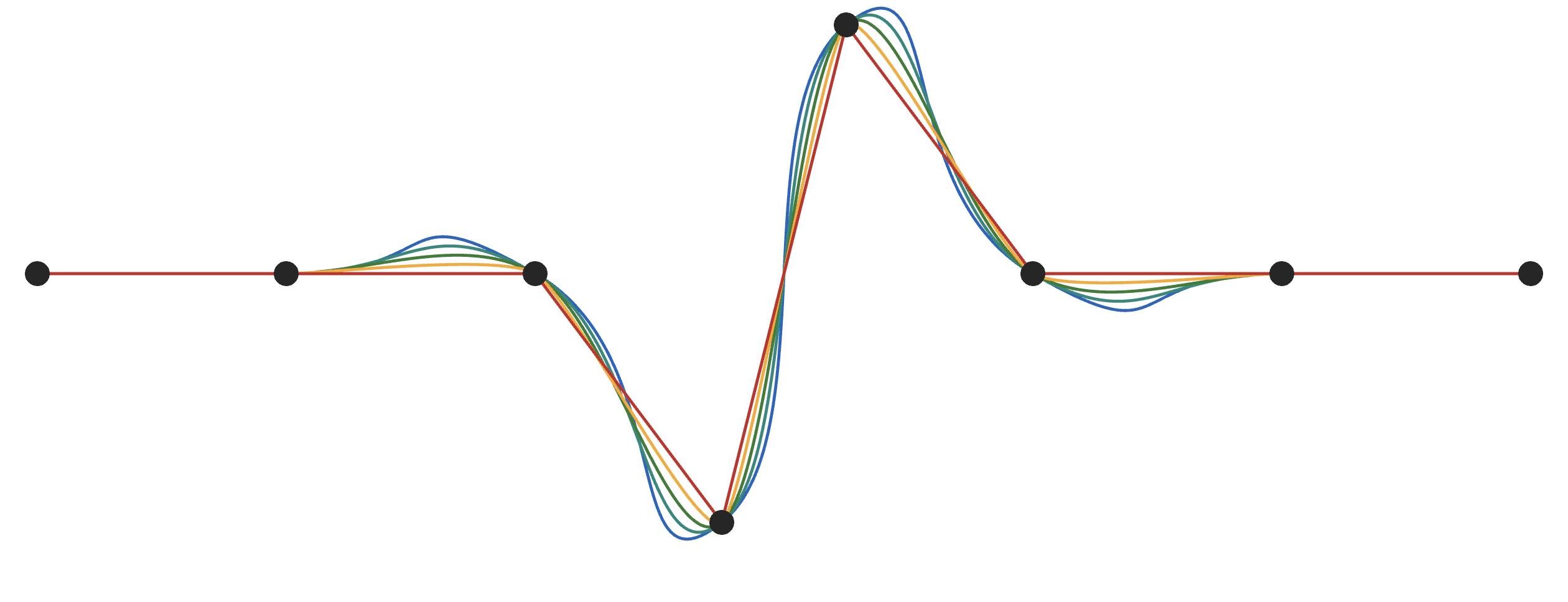
Tension controls the curve
Tension is the only parameter that controls a cardinal cubic spline, and it controls how closely the line hugs the points. At a value of 1, we get straight, jagged lines. Going further toward negative 1, the line becomes looser. A tension of 0 is the most common value and has a special name: the Catmull–Rom spline.





The useful consequence is that you can record a sequence of points—such as stylus samples or points generated by a program—and get a continuous line without separately designing handles for every segment. The curve still passes through the points, so the input remains easy to reason about.
Cardinal cubic splines in BrushCue
BrushCue exposes this curve as Path Cardinal Cubic To Point. It adds a smooth segment from the current path point to the next point and gives you the tension value used above. Use it when you want to tune how tightly a path follows its points.
If you want the conventional tension-zero behavior, use Path Catmull Rom To Point. A Catmull–Rom spline is simply the common cardinal cubic spline preset, so it removes a parameter when you do not need it.
Both operations are also available from the BrushCue Python API. The complete Cardinal Cubic example generates the figures in this post and is a useful starting point for experimenting with points and tension values in code.
For freehand drawing, start with Catmull–Rom (tension 0). Raise the tension when you need the stroke to stay closer to its samples; lower it when you want a looser, more flowing line. The right value is ultimately a visual decision, but cardinal cubic splines make that decision a single, understandable control.